Tuesday, February 9, 2016

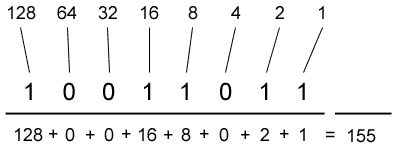
binary to decimal and back again


What Next?

What do I do with my future in computer science? I wanted to get into IT work, getting my hands on to fix problems, setup networks and do jobs; I want to be a problem solver! So how do I go about this? I am currently looking towards security!
import java.util.Scanner;
public class ProgrammingEx4_8 {
 public static void main(String[] args) {
  Scanner input = new Scanner(System.in);
  System.out.print("Enter an ASCII code:");
  int s = input.nextInt();
  System.out.print("The character for ASCII code " + s + " is "
    + (char) s);
 }
}

Subnet calculator


http://www.subnet-calculator.com/

Subnet Calculator Subnet Calculator

Network Class


First Octet Range


IP Address


Hex IP Address


Subnet Mask


Wildcard Mask


Subnet Bits


Mask Bits


Maximum Subnets


Hosts per Subnet


Host Address Range


Subnet ID


Broadcast Address


Subnet Bitmap

110nnnnn.nnnnnnnn.nnnnnnnn.hhhhhhhh


Notes about the Subnet Calculator
  1. The subnet calculator implements a classful / classed IP addressing scheme where the following rules are adhered to:
    • Class A addresses have their first octet in the range 1 to 126 (binary address begins with 0).
    • Class B addresses have their first octet in the range 128 to 191 (binary address begins with 10).
    • Class C addresses have their first octet in the range 192 to 223 (binary address begins with 110).
  2. The subnet calculator allows the use of a single subnet bit - for example, a class C address with a subnet mask of 255.255.255.128 is permitted.
  3. The subnet calculator allows a subnet ID to have its final octet equal to the final octet of its subnet mask - for example, a class C network address of 192.168.0.192 with a subnet mask of 255.255.255.192 is permitted.
The above is generally accepted as being 'normal', however, certification students should keep in mind that, in some certification programs, the final two points are regarded as inacceptible.
For classless subnetting, you can use the CIDR calculator.

IP Addressing

IP addressing

Updated: January 21, 2005
Applies To: Windows Server 2003, Windows Server 2003 R2, Windows Server 2003 with SP1, Windows Server 2003 with SP2

IP addressing

Each TCP/IP host is identified by a logical IP address. This address is unique for each host that communicates by using TCP/IP. Each 32-bit IP address identifies a location of a host system on the network in the same way that a street address identifies a house on a city street.
Just as a street address has a standard two-part format (a street name and a house number), each IP address is separated internally into two parts--a network ID and a host ID:
  • The network ID, also known as a network address, identifies a single network segment within a larger TCP/IP internetwork (a network of networks). All the systems that attach and share access to the same network have a common network ID within their full IP address. This ID is also used to uniquely identify each network within the larger internetwork.
  • The host ID, also known as a host address, identifies a TCP/IP node (a workstation, server, router, or other TCP/IP device) within each network. The host ID for each device identifies a single system uniquely within its own network.
Here is an example of a 32-bit IP address:
10000011 01101011 00010000 11001000
To make IP addressing easier, IP addresses are expressed in dotted decimal notation. The 32-bit IP address is segmented into four 8-bit octets. The octets are converted to decimal (base-10 numbering system) and separated by periods. Therefore, the previous IP address example is 131.107.16.200 when converted to dotted decimal notation.
For more information about dotted decimal notation and the conversion of numbers from binary to decimal, see Converting binary to decimal.
The following illustration shows a sample view of an IP address (131.107.16.200) as it is divided into network and host ID sections. The network ID portion (131.107) is indicated by the first two numbers of the IP address. The host ID portion (16.200) is indicated by the last two numbers of the IP address.
The IP address: network ID and host ID
Notes
  • Because IP addresses identify devices on a network, a unique IP address must be assigned to each device on the network.
  • In general, most computers have only a single network adapter installed and therefore require only a single IP address. If a computer has multiple network adapters installed, each adapter needs its own IP address.

IP address classes

The Internet community has defined five address classes. Class A, B, and C addresses are used for assignment to TCP/IP nodes.
The class of address defines which bits are used for the network and host ID parts of each address. The address class also defines how many networks and hosts per network can be supported.
The following table uses w.x.y.z to designate the four octet values in any given IP address. The table is used to show:
  • How the value of the first octet (w) of any given IP address effectively indicates the class of address.
  • How the octets in an address are divided into network ID and host ID.
  • The number of possible networks and hosts per network available for each class.
https://technet.microsoft.com/en-us/library/cc787434(v=ws.10).aspx

Monday, October 19, 2015

power point and other woes

This week I worked hard on Excel and Power Point to make a presentation for my Biology class; it was a group project although I did most of the work on the actual presentation. Power Point is an amazing program with beautiful image editing software; the ability to make a great presentation is right there at your fingertips.

Excel also has great data processing ability; the raw data I entered got crunched down into graphs. Although this is where I ran into my problem. I had a really hard time getting my second axis (the z axis) and after lots of trial and error I figured it out. It was a painful learning process to get my data to become the graph I needed it to be.

This group project showed me a lot about myself and how I work with others; I took control of the group and worked with those who were willing to apply themselves but being a perfectionist the project had to be perfect in my eyes (with or without the help of my group). In the end the power point presentation is beautiful, with my computer science degree I am very much interested in making multimedia so this project was perfect for me.

Wednesday, September 30, 2015

Logic in Java

log·ic
ˈläjik/
noun
noun: logic
  1. 1.
    reasoning conducted or assessed according to strict principles of validity.

    "experience is a better guide to this than deductive logic"

    synonyms:reasoning, line of reasoning, rationale, argument, argumentation

    "the logic of their argument"
    • a particular system or codification of the principles of proof and inference.

      "Aristotelian logic"
    • the systematic use of symbolic and mathematical techniques to determine the forms of valid deductive argument.
      plural noun: logics
    • the quality of being justifiable by reason.

      "there's no logic in telling her not to hit people when that's what you're doing"

      synonyms:reason, judgment, logical thought, rationality, wisdom, sense, good sense, common sense, sanity;
      informalhorse sense

      "this case appears to defy all logic"
    • the course of action or line of reasoning suggested or made necessary by.

      "if the logic of capital is allowed to determine events"
  2. 2.
    a system or set of principles underlying the arrangements of elements in a computer or electronic device so as to perform a specified task.


Logic. Something that is occasionally lost to the entire world, or so it would seem.

when programming in Java sometimes we need to compare two values, this brings logic into the equation. We have to deal with logical and's, or's, not's and exclusive or's; these might sound a little complicated but with a nice cheat sheet reference guide you too can master the art of logic in programming. You will find yourself using this logic a lot in programming.

Logical && (AND)

True && True = TRUE
True && False = FALSE
False && True = FALSE
False && False = FALSE

Logical || (OR)

True || True = TRUE
True || False = TRUE
False || True = TRUE
False and False = FALSE

Logical ! (NOT)

! True = FALSE
! False = TRUE

Exclusive ^ (OR)

True ^ True = FALSE
True ^ False = TRUE
False ^ True = TRUE
False ^ False = FALSE